Create custom input fields in templates
In this article
What custom input fields are #
A custom input field is a placeholder in your shared Outlook email template that is replaced with data you enter or select through a pop-up dialog when you insert the template into an email message. You can create custom input fields for text and numeric values, dropdown lists, date and time pickers, or values pulled from datasets. To create these fields, you need the WhatToEnter macro.
Read less!Grab cheat sheet instead
Text field
A fillable text field.Dropdown list
A dropdown menu for selecting an item.Number
A fillable field for numbers.Currency
A fillable field for currency amounts.Percentage
A fillable field for percentage values.Date picker
A pop-up calendar.Time picker
A time picker control.Checkbox
A checkbox for choosing between two values.
How to allow only specific values in custom input fields #
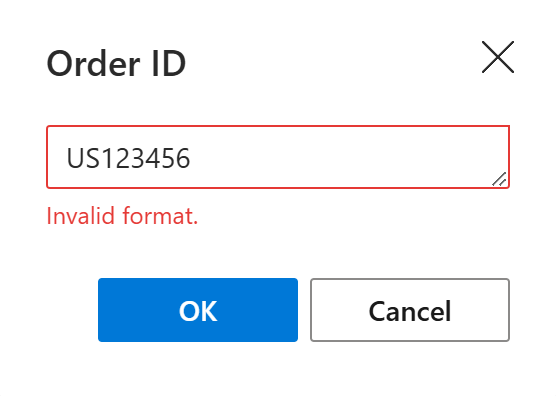
You can use regular expressions to make sure that you and your teammates enter or select only values that match a required pattern when using a shared template with custom input fields.
When creating or editing a custom input field, switch to the Advanced tab.
Under Validate with regex, enter a regular expression to specify the pattern that the user input must match. For example, to allow only order IDs that start with
USfollowed by five digits, such asUS12345, enter^US[0-9]{5}$.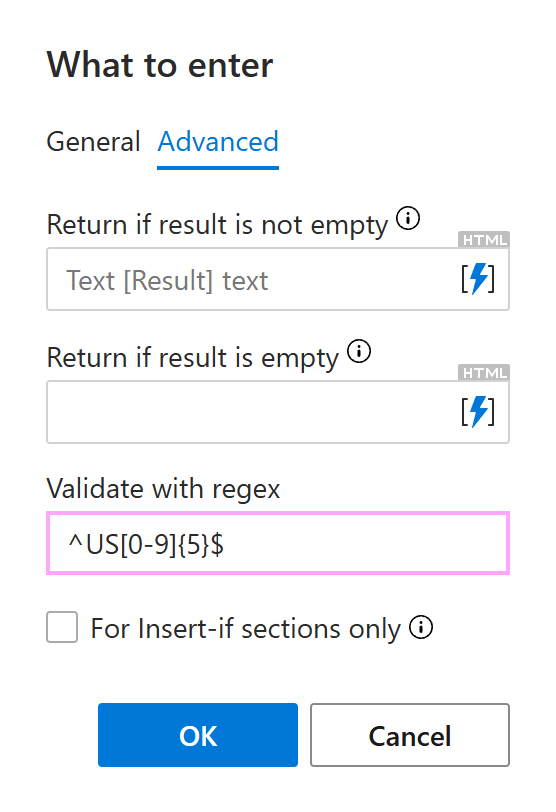
Select OK.
Save the template.
When you or your teammates insert the template into an Outlook email message, the add-in checks the value entered or selected in the pop-up dialog against the regular expression you specified. If the value doesn’t match, the add-in won’t insert it.